| Line 16: | Line 16: | ||
====Latex files==== | ====Latex files==== | ||
| − | == | + | ===Edit a document=== |
| − | + | <span id='cite-_Ref501107834'></span>[[File:Draft_Content_466573186_8265_question.gif|18px|link=|alt=Question icon]] [[#_Ref501107834|How to make changes to a Scipedia document?]] | |
| − | + | <span id='cite-_Ref501107839'></span>[[File:Draft_Content_466573186_8265_question.gif|18px|link=|alt=Question icon]] [[#_Ref501107839|How to make changes to the document basic data such as title, abstract, etc?]] | |
| − | + | <span id='cite-_Ref501107846'></span>[[File:Draft_Content_466573186_8265_question.gif|18px|link=|alt=Question icon]] [[#_Ref501107846|How to make changes to the author’s affiliation information?]] | |
| − | + | <span id='cite-_Ref501107850'></span>[[File:Draft_Content_466573186_8265_question.gif|18px|link=|alt=Question icon]] [[#_Ref501107850|How to add, modify or delete an inserted PDF file in a Scipedia document?]] | |
| − | + | <span id='cite-_Ref501107856'></span>[[File:Draft_Content_466573186_8265_question.gif|18px|link=|alt=Question icon]] [[#_Ref501107856|How to comment contents in Scipedia documents?]] | |
==SUBMIT A DOCUMENT== | ==SUBMIT A DOCUMENT== | ||
Revision as of 17:20, 18 December 2017
Create a document
 Which document file formats can be uploaded in Scipedia
Word files
Are Excel embedded charts supported in Word files?
Are Word heading’s styles supported?
Latex files
Edit a document
How to make changes to a Scipedia document?
How to make changes to the document basic data such as title, abstract, etc?
How to make changes to the author’s affiliation information?
How to add, modify or delete an inserted PDF file in a Scipedia document?
How to comment contents in Scipedia documents?
SUBMIT A DOCUMENT
CREATE A DOCUMENT
1. Which kind of documents can be uploaded in Scipedia?
Documents in Word format (.docx), in PDF format or in Tex/LaTex format are allowed to be submitted in Scipedia. In this latter case, the Tex/LaTex files (.tex) along with all the images must be compressed in a zip file.
2. Are Word embedded charts from Excel supported?
Embedded charts from Excel spreadsheets are unsupported. Save the charts as images in Excel and paste them into the Word document before submitting it. The original Excel worksheet could be linked from the inserted image in order to store the content.
3. Are Word shapes supported?
Shapes added in Word documents are not supported. Save the shape or the combination of multiples shapes as images and paste them into the Word document before submitting it.
4. Are Word heading’s styles supported?
The use of headings styles (both Word built-in styles or customizing ones) in a Word document is highly recommended as the best way to correctly import headings from the original Word document, instead of using text style like bold, italic or capital letters.
EDIT A DOCUMENT
5. How to make changes to a Scipedia document?
Document changes can be made using the Wiki editor ('Edit' menu option) or the Wiki visual editor ('Visual Editor' menu option). These are the preferred options in case of minor changes in the manuscript since it required a minimum knowledge of the Wiki format.
In the case of major changes, the necessary changes can be made in the original Word or LaTeX document and then re-import it, by using the 'RE-IMPORT' option of the right hand side panel.
6. How to make changes to the document basic data such as title, abstract, etc?
Document basic data (e.g. title, abstract, authors, categories, keywords, creation year, DOI, submitted date and published date) can be added or modified through the 'Edit data' menu option.
Modifications made in the 'Edit data' form, such as abstract modifications, are not dumped into the Scipedia content.
7. How to make changes to the author’s affiliation information?
The authors’ affiliation is automatically uploaded from the author profile when a Scipedia document is generated. Nevertheless, the author affiliation of an specific document can be added or modified.
The registered authors of a document can add or modified their affiliation data by using the edition button (  ) near the author name. This affiliation data is only modified in the current document, not in the author profile.
The authors’ affiliation changes are not automatically dumped on the PDF generated from the Scipedia document. The PDF updates are periodically done each 24h.
8. How to add, modify or delete an inserted PDF file in a Scipedia document?
To add, modify or delete a PDF file in a Scipedia document:
- Select "edit" option in the corresponding section through the [edit] link.
- In edition mode, use "Insert a PDF File" bottom and select the PDF document to be inserted in the document content.
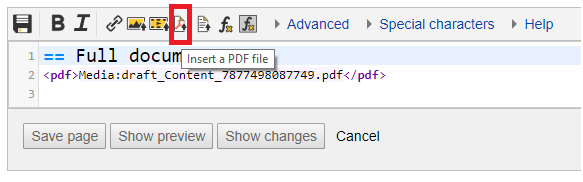

- Just remove the PDF link in order to delete the PDF file from the document.
9. How to comment contents in Scipedia documents?
Comments are defined between comment tags (). Comments are visible only in the edit mode.
SUBMIT A DOCUMENT
10. How to submit a manuscript to a Scipedia journal or collection?
In order to submit a manuscript to a Scipedia journal or collection, follow the next steps:
- Select "CREATE A DOCUMENT" button in your profile page.
- Select the option "UPLOAD A DOCUMENT" (please see the image below). Then select your original document.
- First of all you will be asked to fill a form with some basic information about the document: title, abstract, categories, authors, creation year and keywords.
- After a while, your original document will be submitted in Scipedia as a new draft. This draft will be available from your profile page, under the "Contributions" label.
- Check that your profile data is completed before submitting the document for publication.
- Finally, once the draft is ready to be published, click the "SUBMIT FOR PUBLICATION" button of the right hand side panel, and select the corresponding journal or collection.
11. Are PDF documents allowed to be submitted to a Scipedia journal?
PDF files can only be published in collections. They are not valid for submission to Scipedia journals.